Linux file that does not have "CR" at the end of the line, appears as it had one

Advertisement

aldemarcalazans
Donor
Joined:
Posts:
4
Location:
Brazil

Linux file that does not have "CR" at the end of the line, appears as it had one

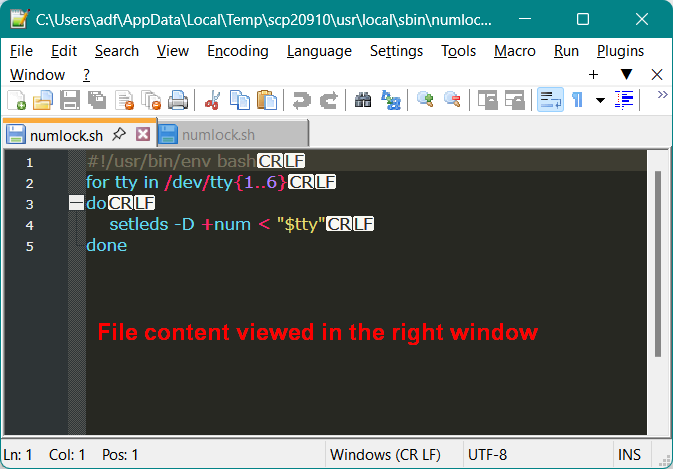
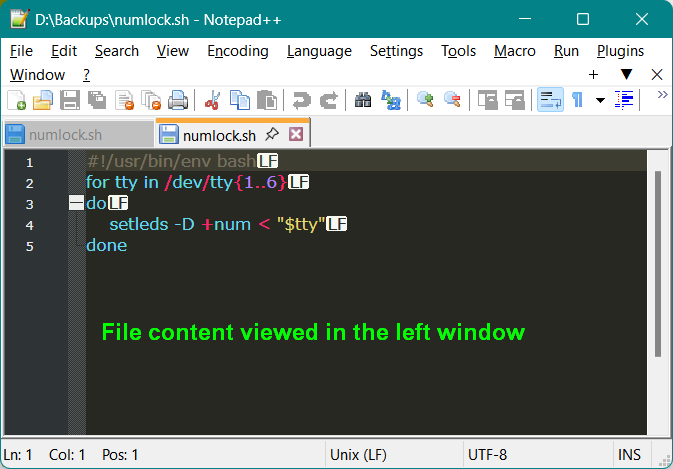
Every time i opened a Linux shell script, in the right window of the application (the one that shows the server files) WinSCP shows a "CR" character at the end of all lines that DOES NOT EXIST. If I copy this file to my computer, and open it again using the left window of the application, the phantom "CR" character disappeear.

file content viewed in the right window.png

file content viewed in the left window.png

Description: The Linux shell script file used in the test (.txt added just to make the upload possible)

Reply with quote

Advertisement

aldemarcalazans
Donor

Forgot to say...

Forgot to say: using WinSCP 6.6.2 RC in Windows 11
Note: same problem in version 6.5.2; older version (don't remember what) did not showed this bug.
Last edited by aldemarcalazans on 2026-07-03 20:12; edited 1 time in total

Reply with quote

martin
Site Admin
martin avatar
Joined:
Posts:
42,963
Location:
Prague, Czechia

Re: Linux file that does not have "CR" at the end of the line, appears as it had one

Thanks for your report. I cannot reproduce the problem.

Please attach a full session log file showing the problem (using the latest version of WinSCP).

To generate the session log file, enable logging, log in to your server and do the operation and only the operation that causes the error. Submit the log with your post as an attachment. Note that passwords and passphrases not stored in the log. You may want to remove other data you consider sensitive though, such as host names, IP addresses, account names or file names (unless they are relevant to the problem). If you do not want to post the log publicly, you can mark the attachment as private.

Reply with quote

aldemarcalazans
Donor
Joined:
Posts:
4
Location:
Brazil

Re: Linux file that does not have "CR" at the end of the line, appears as it had one

martin wrote:

Thanks for your report. I cannot reproduce the problem.
Please attach a full session log file showing the problem (using the latest version of WinSCP).

As requested, the log file with debugging level 2.
  • VirtualBox-1-#---VMCENTOS079---127.0.0.10.log (151.62 KB, Private file)

Reply with quote

Advertisement

You can post new topics in this forum