Error while getting file from FTP. Size of file – more 2TB.
Using this command
When size of file more 2TB, some time getting error :
And I can not continue getting file with key
Got anyone this error in same situation (big size of file)?
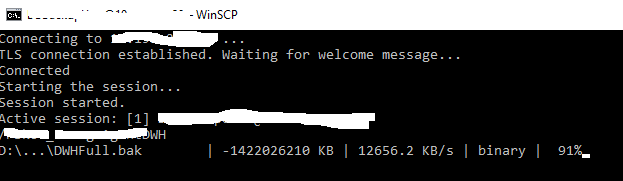
I think 100% problem is in overflow when WinSCP getting file size. It show in screenshot. This is a reason error when use -resume key. I have received same problem when this situation testing in GUI WinSCP with resume mode.
Using WinSCP for backup bases. I don't want mapping disk.
Get -preservetime -resume DWHFull.bak "D:\BackUp\Temp\DWHFull\"
  <failure>
    <message>Error transferring file '/DWH/DWHFull.bak'.</message>
    <message>An unknown error occurred while accessing D:\BackUp\Temp\DWHFull\DWHFull.bak.</message>
    <message>Copying files from remote side failed.</message>
    <message>The specified network name is no longer available. </message>
  </failure>
-resume. I delete partial file and restart downloading. When size of file less than 2TB, all ok, key -resume - working.
Got anyone this error in same situation (big size of file)?
I think 100% problem is in overflow when WinSCP getting file size. It show in screenshot. This is a reason error when use -resume key. I have received same problem when this situation testing in GUI WinSCP with resume mode.
Using WinSCP for backup bases. I don't want mapping disk.
Last edited by Michael on 2026-06-26 08:18; edited 1 time in total
- WinSCPErr.png (6.96 KB)