Jump List
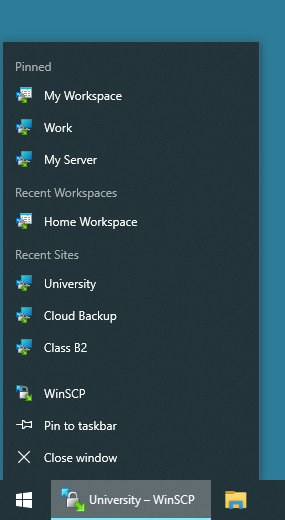
WinSCP supports jump lists.
From WinSCP jump list you can open recent sites and workspaces.
If there’s already an idle WinSCP instance running, the session (or workspace) opens in the existing instance by default. This can be changed in preferences. Alternative mode can be selected by holding down Shift key, when clicking on respective jump list entry.1
Advertisement
You can also pin your favorite sites or workspace for quick access.
- Note that jump list is out of WinSCP control, so it cannot really detect that
Shiftkey is hold down, when jump list entry is clicked. TheShiftkey has to be actually held down until WinSCP starts, so that is can detect it.Back