Preparing to Install Page (WinSCP Installer)
The WinSCP Installer stops on the Preparing to Install page, when it needs to upgrade the WinSCP drag&drop shell extension, and an application has this DLL locked (loaded), and it is not possible to delay the upgrade until the next computer restart.1
Typically, the application is Windows Explorer.
The installer can automatically close the application to release the extension, upgrade the extension, and restart the application.
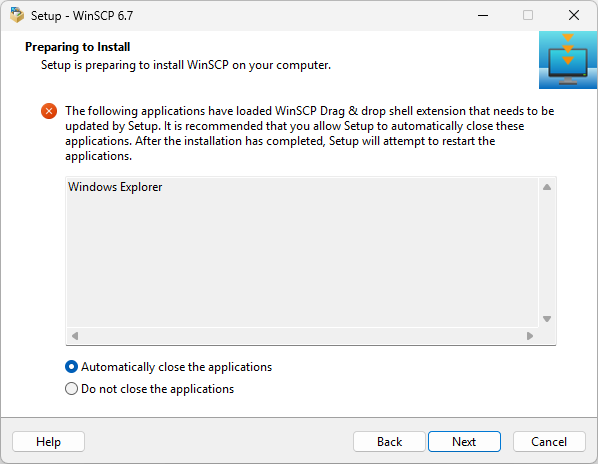
It is recommended that you keep the default option, Automatically close the applications, to allow the installer to upgrade the extension.
When restarting the Windows Explorer, the Windows taskbar, the Start menu and desktop icons will momentarily disappear. You will lose any opened Windows Explorer windows or ongoing file transfers.
If you select Do not close the applications, the installer will not be able to upgrade the extension and will ask you to restart your machine at the end of the installation.
Use the Next button to confirm your selection and install the application.
- Typically the upgrade cannot be scheduled for the next restart, because the installer is not running with Administrator privileges (WinSCP is being installed for the current user only).Back